








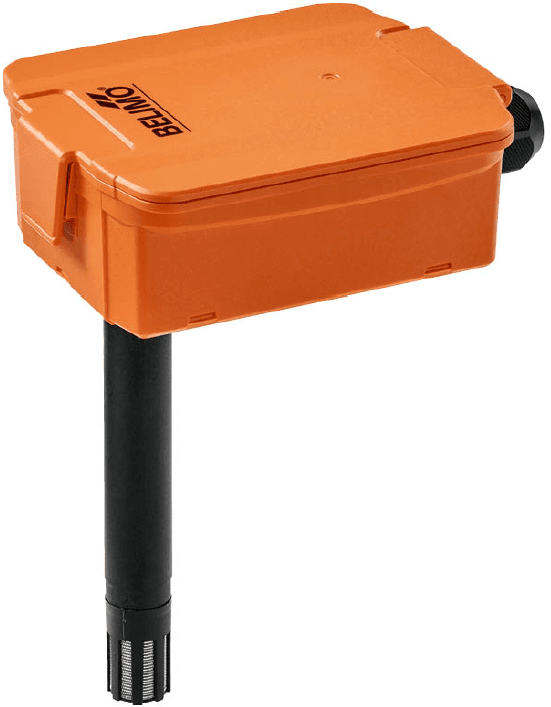
Belimo Temperature and Humidity Sensor Modbus RTU
Measures temperature, humidity, enthalpy, and dew point for duct or outside air applications.
This template connects Belimo 22DTH and 22UTH series temperature and humidity sensors via Modbus RTU. It reads temperature, relative and absolute humidity, enthalpy, dew point, and operating hours. It also allows configuration of offset calibration, output limits, and maintenance countdowns.
- Protocol
- Modbus RTU
- Connection
- RS485, 38400 baud
- Registers
- 28, read and write
- Brand
- Belimo
- Key readings
- Temperature · Relative Humidity · Absolute Humidity · Enthalpy · Dew Point · Operating Hours Counter
- Available commands
- Offset Temperature / Humidity · Output Limits (Temp, RH, Enthalpy, Dew Point) · Selection of Unitary System · Maintenance / Inspection Countdown
- Compatible models
- 22DTH-..5.. · 22UTH-..50X
- Last updated
Registers (28)
12 read, 16 write
| Name | Unit | Access | Address (Hidden until you enter your email) | Function (hidden) | Type (hidden) |
|---|---|---|---|---|---|
| Temperature | °C | Read | |||
| Relative Humidity | %RH | Read | |||
| Absolute Humidity | g/m3 | Read | |||
| Enthalpy | kJ/kg | Read | |||
| Dew Point | °C | Read | |||
| Sensor Detection | Read | ||||
| Hardware version main circuit board | Read | ||||
| Firmware version main circuit board | Read | ||||
| Hardware version RS 485 module | Read | ||||
| Firmware version RS 485 module | Read | ||||
| Operating hours counter | h | Read | |||
| Device Detection | Read | ||||
| Offset Temperature | °C | Write | |||
| Offset Relative Humidity | %RH | Write | |||
| Lower Limit Temperature | °C | Write | |||
| Upper Limit Temperature | °C | Write | |||
| Lower Limit Relative Humidity | %RH | Write | |||
| Upper Limit Relative Humidity | %RH | Write | |||
| Lower Limit Absolute Humidity | g/m3 | Write | |||
| Upper Limit Absolute Humidity | g/m3 | Write | |||
| Lower Limit Enthalpy | kJ/kg | Write | |||
| Upper Limit Enthalpy | kJ/kg | Write | |||
| Lower Limit Dew Point | °C | Write | |||
| Upper Limit Dew Point | °C | Write | |||
| Selection of the Unitary System | Write | ||||
| Minimum output voltage | V | Write | |||
| Countdown for maintenance | h | Write | |||
| Countdown for visual inspection | h | Write |
Loading registers…
Send your device list
If a device is not in the library yet, we build the template for free as soon as we have the register data.
Use cases
- Monitor duct temperature and humidity levels on a live dashboard to verify ventilation system performance.
- Create an alert when relative humidity exceeds a threshold, indicating potential condensation risk in ductwork.
- Track dew point readings over time to optimize dehumidification schedules in climate-sensitive environments.
- Remotely adjust temperature and humidity offset calibration without dispatching a technician to site.
- Log operating hours and configure maintenance countdown timers to schedule preventive sensor inspections.
- Compare outside air enthalpy with return air enthalpy to validate economizer free-cooling strategies.
Installation
Wire the Belimo sensor to the ModbusCloud gateway RS-485 terminals, connecting A, B, and GND according to the sensor wiring diagram.
Set the sensor baud rate to 38400 and configure a unique Modbus slave address using the DIP switches or configuration tool on the device.
Ensure proper RS-485 bus termination if the sensor is the last device on the bus.
Import the Belimo Temperature and Humidity Sensor template in the ModbusCloud platform and assign the correct slave address.
Verify that readings for temperature, humidity, and dew point appear on the dashboard, then adjust offset calibration registers if needed.
Things to watch for
The gateway cannot communicate with the sensor. What should I check?
Verify that the baud rate on the sensor matches 38400 as expected by the template. Also confirm correct RS-485 wiring polarity (A and B terminals) and that the Modbus slave address matches the address configured in ModbusCloud.
Humidity readings show zero or unexpected values. Why?
The humidity output may be configured to send enthalpy or dew point instead. Check the output selection register to ensure relative or absolute humidity is selected as the active output signal.
Can I use this template for both duct and outside air models?
Yes. The Belimo 22DTH (duct) and 22UTH (outside air) share the same Modbus register map. One template works for both models.
How do I calibrate the sensor remotely?
Use the offset temperature and offset humidity registers exposed in the template. Write the desired correction values through the ModbusCloud platform to apply calibration without a site visit.
Want to see how it works?
