








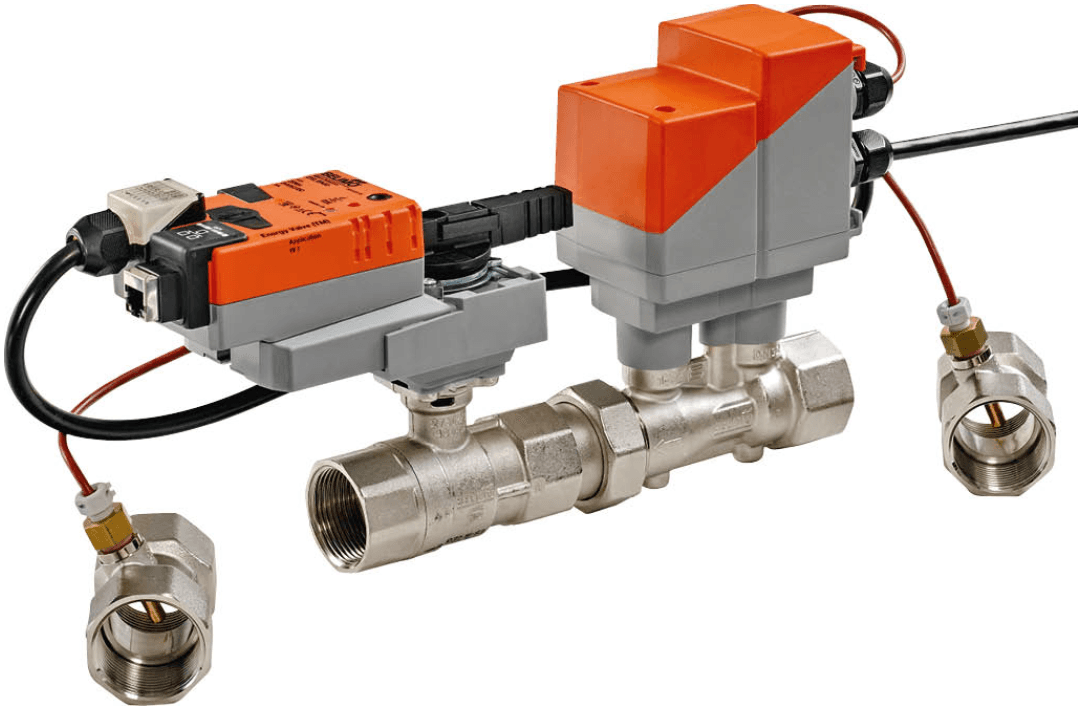
Belimo Energy Valve V3 Modbus TCP
Monitors and controls hydronic energy flow with pressure-independent valve positioning.
Template for the Belimo Energy Valve V3 over Modbus TCP. Reads flow, power, energy, temperatures, delta-T, and glycol concentration. Allows control of setpoints, control mode, delta-T setpoint, and Vmax/Pmax limits from the ModbusCloud dashboard.
- Protocol
- Modbus TCP
- Connection
- Ethernet, Modbus TCP
- Registers
- 56, read and write
- Brand
- Belimo
- Key readings
- Absolute volumetric flow · Absolute power (kW) · Energy heating/cooling (kWh) · Temperature 1 and 2 (°C) · Delta temperature (K) · Glycol concentration (%)
- Available commands
- Setpoint (%) · Control Mode · Delta T setpoint (K) · Vmax / Pmax limits
- Compatible models
- EV..R+(K)BAC(1) · EV..R3+BAC · EV..F+(K)BAC(1)
- Last updated
Registers (56)
40 read, 16 write
| Name | Unit | Access | Address (Hidden until you enter your email) | Function (hidden) | Type (hidden) |
|---|---|---|---|---|---|
| Actuator type | Read | ||||
| Relative position | % | Read | |||
| Absolute position | °C | Read | |||
| Relative flow | % | Read | |||
| Absolute volumetric flow in selected unit | l/min | Read | |||
| Setpoint analog | V | Read | |||
| Temperature 1 in degree Celsius | °C | Read | |||
| Temperature 1 in degree Fahrenheit | °F | Read | |||
| Temperature 2 in degree Celsius | °C | Read | |||
| Temperature 2 in degree Fahrenheit | °F | Read | |||
| Delta temperature in K | K | Read | |||
| Delta temperature in degree F | °F | Read | |||
| Glycol concentration | % | Read | |||
| Relative power | % | Read | |||
| Series Number 1st part | Read | ||||
| Series Number 2nd part | Read | ||||
| Series Number 4th part | Read | ||||
| Firmware version | Read | ||||
| Malfunction and Service Information | Read | ||||
| DeltaT Manager Status | Read | ||||
| Absolute volumetric flow in liter per second | l/s | Read | |||
| Absolute volumetric flow in gpm | gpm | Read | |||
| Setpoint absolute flow in selected unit | l/min | Read | |||
| Absolute power in selected unit | kW | Read | |||
| Absolute power in kW | kW | Read | |||
| Absolute power in kBtu per hour | kBtu/h | Read | |||
| Energy Cooling in selected unit | kWh | Read | |||
| Energy Cooling in kWh | kWh | Read | |||
| Energy Cooling in kBtu | kBtu | Read | |||
| Energy Heating in selected unit | kWh | Read | |||
| Energy Heating in kWh | kWh | Read | |||
| Energy Heating in kBtu | kBtu | Read | |||
| Nominal volumetric flow in selected unit | l/min | Read | |||
| Nominal volumetric flow in liter per second | l/s | Read | |||
| Nominal volumetric flow in gpm | gpm | Read | |||
| Nominal power in selected unit | Read | ||||
| Nominal power in kW | kW | Read | |||
| Nominal power in kBtu per hour | kBtu/h | Read | |||
| Setpoint flow at DeltaT in liter per second | l/s | Read | |||
| Setpoint flow at DeltaT in gpm | gpm | Read | |||
| Setpoint | % | Write | |||
| Override control | Write | ||||
| Vmax in percent of Vnom | % | Write | |||
| Pmax in percent of Pnom | % | Write | |||
| Delta T Limitation | Write | ||||
| Setpoint DeltaT in K | K | Write | |||
| Setpoint DeltaT in F | °F | Write | |||
| Control Mode | Write | ||||
| Unit Selection Flow | Write | ||||
| Unit Selection Power | Write | ||||
| Unit Selection Energy | Write | ||||
| Setpoint Source | Write | ||||
| Absolute Vmax in liter per second | l/s | Write | |||
| Absolute Vmax in gpm | gpm | Write | |||
| Absolute Pmax in kW | kW | Write | |||
| Absolute Pmax in kBtu per hour | kBtu/h | Write |
Loading registers…
Send your device list
If a device is not in the library yet, we build the template for free as soon as we have the register data.
Use cases
- Monitor real-time flow, power, and cumulative energy consumption per hydronic zone on a live dashboard.
- Create alerts when delta temperature drops below the setpoint, indicating potential hydraulic imbalance.
- Remotely adjust the valve setpoint and Vmax or Pmax limits to optimize energy distribution without a site visit.
- Track glycol concentration over time and receive a notification if it falls outside the acceptable range.
- Compare heating and cooling energy totals across multiple Energy Valves to identify energy leaks in the building.
- Log thermal energy data for reporting to building owners or energy consultants on a weekly or monthly basis.
Installation
Connect the Belimo Energy Valve V3 to the local IP network and assign it a static IP address using the Belimo configuration tool or the device display.
Verify that Modbus TCP is enabled on the Energy Valve V3 and note the configured Modbus TCP port (default 502).
Wire your ModbusCloud Gateway to the same IP network and ensure it can reach the valve IP address.
In the ModbusCloud portal, add a new Modbus TCP device using the valve IP address and port, then import the Belimo Energy Valve V3 template.
Confirm that register values such as flow, power, and temperatures appear correctly on the dashboard, paying attention to the uint32 two-word registers.
If needed, adjust the template unit variant from metric to imperial to match your project requirements.
Things to watch for
Why do flow and energy readings show incorrect or very large values?
The Energy Valve V3 uses uint32 (two-word) registers for flow, power, and energy. Make sure the register length is set to 2 words and the byte/word order matches the Belimo default (big-endian). The template configures this automatically, but manual edits can break it.
Can I use this template for the Energy Valve V4?
No. The V4 has a different register map and additional features such as MID-certified metering and Power over Ethernet. Use the dedicated V4 template if available.
What is the default Modbus TCP port on the Energy Valve V3?
The default port is 502. You can verify or change it through the Belimo configuration interface or the device display.
Do I need a specific firmware version on the Energy Valve V3?
Belimo recommends running the latest available firmware to ensure full Modbus TCP register support. Check the Belimo website or contact Belimo support for the minimum firmware version required for all mapped registers.
Want to see how it works?
