








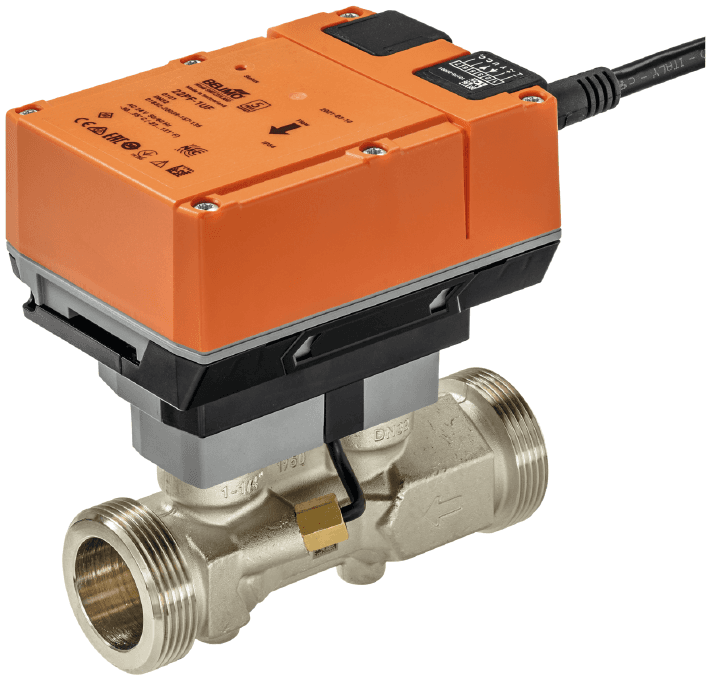
Belimo Flow Sensor Modbus RTU
Measures ultrasonic flow, temperature, and glycol concentration in HVAC water systems.
Modbus RTU template for the Belimo 22PF-1U ultrasonic flow sensor. Reads volumetric flow, accumulated volume, temperature, and glycol concentration in closed HVAC water systems. Also allows configuration of measurement units via writable registers.
- Protocol
- Modbus RTU
- Connection
- RS485, 38400 baud
- Registers
- 25, read and write
- Brand
- Belimo
- Key readings
- Absolute volumetric flow · Relative volumetric flow · Temperature · Glycol concentration · Total volume · Malfunction and service info
- Available commands
- Unit selection flow · Unit selection volume · Sensor 1 type
- Compatible models
- 22PF-1U
- Last updated
Registers (25)
22 read, 3 write
| Name | Unit | Access | Address (Hidden until you enter your email) | Function (hidden) | Type (hidden) |
|---|---|---|---|---|---|
| Relative volumetric flow | % | Read | |||
| Absolute volumetric flow in selected unit | l/h | Read | |||
| T_C | °C | Read | |||
| T_F | °F | Read | |||
| Glycol concentration | % | Read | |||
| Series Number 1st part | Read | ||||
| Series Number 2nd part | Read | ||||
| Series Number 4th part | Read | ||||
| Firmware version | Read | ||||
| Malfunction and Service Information | Read | ||||
| Absolute volumetric flow in liter per second | l/s | Read | |||
| Absolute volumetric flow in gpm | gpm | Read | |||
| Maximum flow in selected unit | l/h | Read | |||
| Maximum flow in liter per second | l/s | Read | |||
| Maximum flow in gpm | gpm | Read | |||
| Meter Serial Number 1st Part | Read | ||||
| Meter Serial Number 2nd Part | Read | ||||
| Sensor Value 1 | mV | Read | |||
| Total volume in cubic meter | m³ | Read | |||
| Total volume in gallon | gal | Read | |||
| Total volume in selected unit | m³ | Read | |||
| Bus termination | Read | ||||
| Unit Selection Flow | Write | ||||
| Unit Selection Volume | Write | ||||
| Sensor 1 Type | Write |
Loading registers…
Send your device list
If a device is not in the library yet, we build the template for free as soon as we have the register data.
Use cases
- Monitor real-time volumetric flow and temperature on a cloud dashboard to verify HVAC system performance remotely.
- Create alerts when glycol concentration drops below a defined threshold, replacing periodic manual measurements.
- Track accumulated volume over time to detect unexpected consumption or leaks in heating and cooling circuits.
- Set up malfunction notifications so you are informed immediately when the sensor reports an error or service condition.
- Compare flow readings across multiple Belimo sensors in a building to identify balancing issues between circuits.
- Log historical flow and temperature data for energy audits or maintenance reporting.
Installation
Install the Belimo 22PF-1U sensor inline using the two external threads (ISO 228-1) and connect the AC/DC 24 V power supply.
Wire the RS-485 A and B terminals of the sensor to the corresponding terminals on your ModbusCloud Gateway.
Set the Modbus RTU slave address on the sensor using the Belimo Assistant App via NFC, and confirm the baud rate is set to 38400.
In the ModbusCloud portal, add a new device and select the Belimo Flow Sensor Modbus RTU template from the library.
Enter the configured slave address and verify that the gateway serial port settings match: 38400 baud, 8 data bits, no parity, 1 stop bit (or as configured on the sensor).
Confirm that register values such as absolute volumetric flow and temperature appear correctly on the dashboard.
Things to watch for
Why am I reading zero or incorrect values for absolute volumetric flow?
The absolute volumetric flow register at address 9 is a uint32 value spanning two consecutive registers. Make sure your gateway is configured to read both registers and that the correct byte order (big-endian) is selected in the template settings.
What baud rate should I use for the Belimo flow sensor?
This template is configured for 38400 baud. Verify that the sensor baud rate matches by checking or setting it via the Belimo Assistant App over NFC. A mismatch will cause communication timeouts.
Can I connect an external temperature sensor for energy calculations?
Yes. The Belimo 22PF-1U supports an external temperature sensor for supply and return differential measurements. Connect the sensor to the designated input on the device and select the correct sensor type using the writable register in this template.
Do I need to enable Modbus RTU on the sensor before it will respond?
The sensor supports multiple protocols. Use the Belimo Assistant App via NFC to confirm that Modbus RTU is the active communication protocol. If BACnet MS/TP or MP-Bus is selected instead, the sensor will not respond to Modbus queries.
Want to see how it works?
