








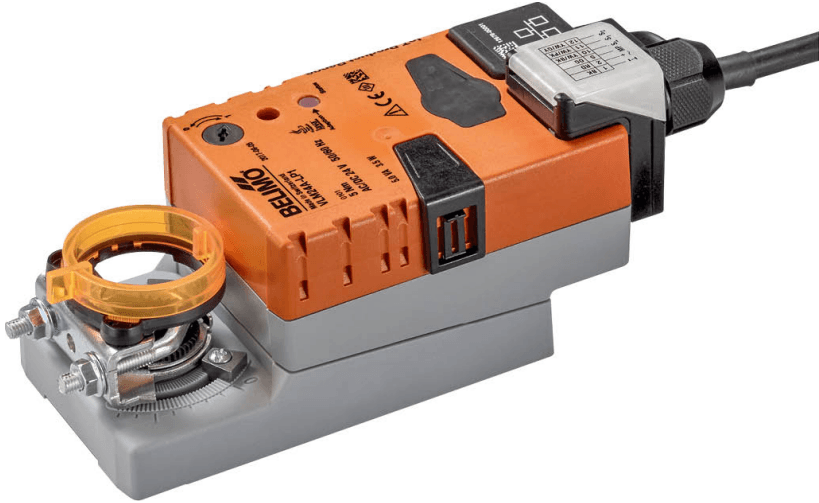
Belimo IoT Actuator Modbus TCP
Controls cloud-capable Belimo IoT actuators via Modbus TCP.
Template for Belimo IoT actuators (V..M24A-LP1, V..R24A-LP1) over Modbus TCP. Reads actuator position, sensor values, and malfunction data. Writes setpoint, override control, setpoint source, and sensor type configuration.
- Protocol
- Modbus TCP
- Connection
- Ethernet, Modbus TCP
- Registers
- 16, read and write
- Brand
- Belimo
- Key readings
- Relative Position · Absolute Position · Sensor 1 and 2 Values · Setpoint Analog · Malfunction and Service Information · Actuator Type
- Available commands
- Setpoint · Override Control · Setpoint Source · Sensor 1 and 2 Type
- Compatible models
- V..M24A-LP1 · V..R24A-LP1
- Last updated
Registers (16)
11 read, 5 write
| Name | Unit | Access | Address (Hidden until you enter your email) | Function (hidden) | Type (hidden) |
|---|---|---|---|---|---|
| Actuator Type | Read | ||||
| Relative Position | % | Read | |||
| Absolute Position | °C | Read | |||
| Sensor 1 Value | Read | ||||
| Setpoint Analog | % | Read | |||
| Series Number 1st Part | Read | ||||
| Series Number 2nd Part | Read | ||||
| Series Number 4th Part | Read | ||||
| Firmware Version | Read | ||||
| Malfunction and Service Information | Read | ||||
| Sensor 2 Value | Read | ||||
| Setpoint | % | Write | |||
| Override Control | Write | ||||
| Sensor 1 Type | Write | ||||
| Setpoint Source | Write | ||||
| Sensor 2 Type | Write |
Loading registers…
Send your device list
If a device is not in the library yet, we build the template for free as soon as we have the register data.
Use cases
- Monitor relative and absolute valve position on a live dashboard for remote HVAC supervision.
- Create an alert when a malfunction or service notification is reported by the Belimo actuator.
- Adjust the actuator setpoint remotely to optimize heating or cooling circuit performance.
- Log sensor 1 and sensor 2 values over time to analyze flow or temperature trends.
- Configure override control and setpoint source during commissioning without accessing the actuator locally.
- Track actuator type and service information across multiple sites from a single platform.
Installation
Connect the Belimo IoT actuator to the same IP network as your ModbusCloud Gateway using a standard Ethernet cable.
Assign a static IP address to the Belimo actuator and note the configured Modbus TCP port (default is 502).
Ensure Modbus TCP communication is enabled on the actuator, which may require configuration via the Belimo Cloud or the device's onboard interface.
In the ModbusCloud platform, add a new device and import the Belimo IoT Actuator Modbus TCP template from the template library.
Enter the actuator's IP address and port in the gateway configuration and verify that readings such as relative position and sensor values appear on the dashboard.
If using hybrid mode, confirm that the analog control signal is wired to the actuator from the higher-level controller, and note that the setpoint register will be read-only in this mode.
Things to watch for
Can I write the control setpoint in hybrid mode?
No. In hybrid mode, the actuator receives its control signal from an external analog source. The setpoint register cannot be written via Modbus TCP in this mode. All other data points remain writable.
What is the default Modbus TCP port for Belimo IoT actuators?
The default port is typically 502. Verify the setting in the actuator's network configuration or the Belimo Cloud portal before connecting.
The gateway connects but sensor values show zero. What should I check?
Ensure that the correct sensor type is configured for sensor inputs 1 and 2. If no physical sensor is connected to an input, the actuator will report a zero or invalid value. Use the sensor type write registers in the template to match the installed sensor.
Which Belimo actuator models are compatible with this template?
The template supports V..M24A-LP1 and V..R24A-LP1 series actuators. Other Belimo IoT actuators may use different register maps and are not guaranteed to work with this template.


Want to see how it works?
