








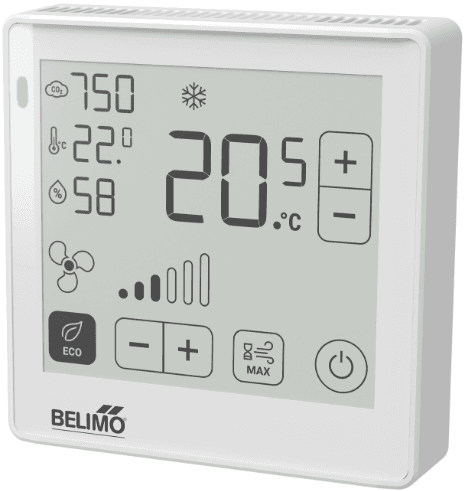
Belimo Room Operating Unit Modbus RTU
Measures room CO2, humidity, and temperature with adjustable setpoints via Modbus RTU.
Modbus RTU template for the Belimo Room Operating Unit (P-22RT series). Reads room temperature, relative humidity, CO2 concentration, and dew point. Allows remote adjustment of temperature setpoints, ventilation stages, and air quality thresholds.
- Protocol
- Modbus RTU
- Connection
- RS485, 38400 baud
- Registers
- 51, read and write
- Brand
- Belimo
- Key readings
- Room Temperature · Relative Humidity · CO2 Value · Dew Point Temperature · Air Quality Status · Digital Input
- Available commands
- Room/Zone Temperature Setpoint · Ventilation Stage · System Operation Mode · Enable Local Adjustment
- Compatible models
- P-22RT..-1U00A-2 · P-22RT..-1U00D-2
- Last updated
Registers (51)
13 read, 38 write
| Name | Unit | Access | Address (Hidden until you enter your email) | Function (hidden) | Type (hidden) |
|---|---|---|---|---|---|
| Room Temperature in Celcius | °C | Read | |||
| Room Temperature in Selected Unit | °C | Read | |||
| Relative Humidity | % | Read | |||
| CO2 Value of the Room | ppm | Read | |||
| Dew Point Temperature in Celcius | °C | Read | |||
| Dew Point Temperature in Selected Unit | °C | Read | |||
| Air Quality Status | Read | ||||
| Digital Input | Read | ||||
| Bus Termination | Read | ||||
| Serial Number Device – 1st part | Read | ||||
| Serial Number Device – 2nd part | Read | ||||
| Serial Number Device – 4th part | Read | ||||
| Firmware Version | Read | ||||
| Display Warning Icon | Write | ||||
| Display Window Icon | Write | ||||
| Room/Zone Temperature Setpoint in Celcius | °C | Write | |||
| Set Ventilation Stage | % | Write | |||
| System Operation Mode | Write | ||||
| Ventilation Stage Control Mode | Write | ||||
| Heating and Cooling Application Status | Write | ||||
| Enable Local Adjustment | Write | ||||
| Room/Zone Temperature Setpoint in Selected Unit | °C | Write | |||
| Relative Room/Zone Temperature Setpoint in Celcius | °C | Write | |||
| Relative Room/Zone Temperature Setpoint in Selected Unit | °C | Write | |||
| Room Temperature Offset | K | Write | |||
| Relative Humidity Offset | % | Write | |||
| CO2 Value Offset | ppm | Write | |||
| CO2 Limit for Good Air Quality | ppm | Write | |||
| CO2 Limit for Medium Air Quality | ppm | Write | |||
| Air Quality Indication | Write | ||||
| Window Icon Function | Write | ||||
| Mode Temperature on Display | Write | ||||
| Display Ventilation Stages | Write | ||||
| Select the preferable temperature unit | Write | ||||
| Unit for temperature shown on display | Write | ||||
| Select the preferable differential temperature unit | Write | ||||
| Light/Dark Color Scheme | Write | ||||
| Display Room/Zone Temperature | Write | ||||
| Display Relative Humidity | Write | ||||
| Display CO2 Value | Write | ||||
| Display Heating/Cooling Icon | Write | ||||
| Warning Icon Function | Write | ||||
| Eco Button Mode | Write | ||||
| Display Boost Button | Write | ||||
| Mode On/Off Button | Write | ||||
| Boost Mode Duration | s | Write | |||
| Temperature Setpoint Type | Write | ||||
| Default Room Temperature Setpoint | Write | ||||
| Adjustment range temperature setpoint | Write | ||||
| Ventilation Stage Configuration | Write | ||||
| Ventilation Control Mode | Write |
Loading registers…
Send your device list
If a device is not in the library yet, we build the template for free as soon as we have the register data.
Use cases
- Monitor room CO2, humidity, and temperature on a live cloud dashboard for multiple building zones.
- Create alerts when CO2 concentration exceeds configurable air quality thresholds in occupied spaces.
- Remotely adjust temperature setpoints for individual rooms without dispatching a technician to site.
- Log dew point trends over time to detect condensation risk in climate-sensitive areas.
- Switch ventilation stages remotely based on occupancy schedules or seasonal changes.
- Verify sensor accuracy by adjusting temperature, humidity, and CO2 offsets from the cloud interface.
Installation
Wire the Belimo Room Operating Unit to the RS485 bus of your ModbusCloud Gateway, connecting A, B, and GND terminals.
Set the Modbus RTU slave address on the Belimo device using its built-in configuration menu or DIP switches, and note the address for the gateway setup.
Confirm the baud rate is set to 38400 on both the Belimo unit and the ModbusCloud gateway serial port configuration.
Import the Belimo Room Operating Unit Modbus RTU template in the ModbusCloud platform and assign it to the correct gateway and slave address.
Verify live data by checking that room temperature, humidity, and CO2 values appear on your ModbusCloud dashboard.
If needed, adjust sensor offset registers (110, 111, 112) and temperature unit register (120) through the writable register controls in the template.
Things to watch for
I get no response from the Belimo unit after wiring. What should I check?
Verify that the RS485 A and B lines are not swapped and that a GND reference wire is connected. Confirm the slave address and baud rate (38400) match between the device and the gateway. Also ensure that the bus is properly terminated if the unit is at the end of the chain.
CO2 readings seem inaccurate or stuck at zero. What could cause this?
Some P-22RT models require a warm-up period of several minutes after power-on before CO2 readings stabilize. Also verify that the CO2 sensor variant is present in your specific model, as not all P-22RT sub-variants include a CO2 sensor.
Can I change the temperature display from Celsius to Fahrenheit remotely?
Yes. Write to register 120 to switch the temperature unit. The change applies to both local display and reported Modbus values.
How do I calibrate the sensor offsets through ModbusCloud?
Use the writable registers at addresses 110 (temperature offset), 111 (humidity offset), and 112 (CO2 offset). Enter the correction value to compensate for mounting position effects. The offset is applied to all subsequent readings.
Want to see how it works?
