








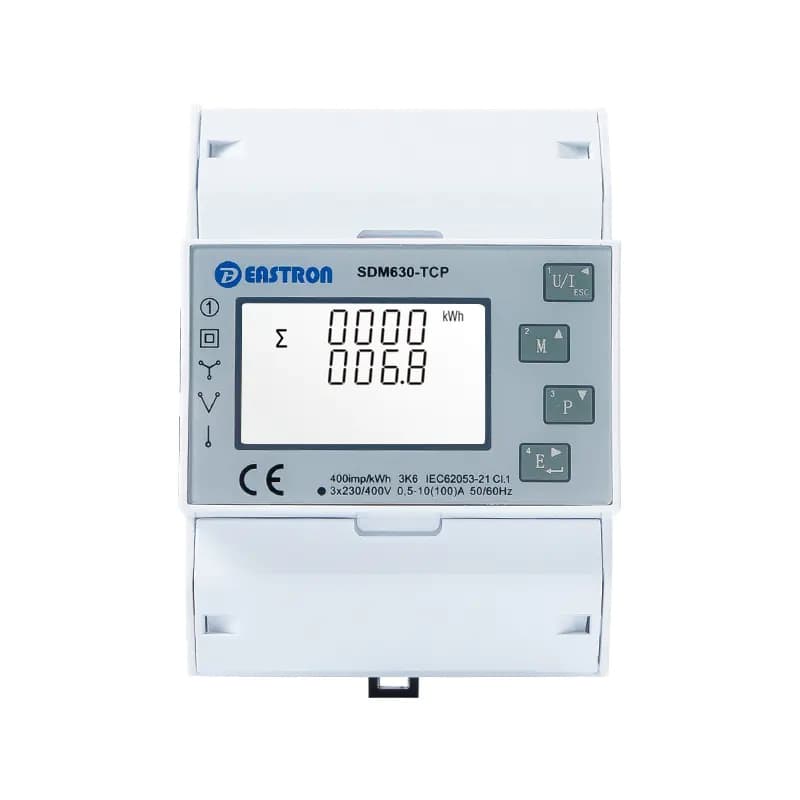
Eastron SDM630-TCP
Reads and configures all parameters of an Eastron SDM630-TCP energy meter via Modbus TCP.
Template for the Eastron SDM630-TCP three-phase energy meter over Modbus TCP. Reads voltage, current, power, energy, power factor, THD, and demand values across all three phases. Also allows configuration of network settings such as IP address, subnet mask, gateway, port, and DHCP.
- Protocol
- Modbus TCP
- Connection
- Ethernet, Modbus TCP
- Registers
- 100, read and write
- Brand
- Eastron
- Key readings
- Line voltage L1 to L3 · Current L1 to L3 · Power L1 to L3 and total · Energy import/export since reset · Power factor and phase angle · Voltage and current THD
- Available commands
- IP address · IP subnet mask and gateway · IP port · DHCP enabled
- Compatible models
- SDM630-TCP
- Last updated
Registers (100)
100 read, 11 write
| Name | Unit | Access | Address (Hidden until you enter your email) | Function (hidden) | Type (hidden) |
|---|---|---|---|---|---|
| 001 - Line voltage L1 | V | Read | |||
| 002 - Line voltage L2 | V | Read and write | |||
| 003 - Line voltage L3 | V | Read | |||
| 004 - Current L1 | A | Read | |||
| 005 - Current L2 | A | Read | |||
| 006 - Current L3 | A | Read and write | |||
| 007 - Power L1 | kW | Read | |||
| 008 - Power L2 | kW | Read and write | |||
| 009 - Power L3 | kW | Read | |||
| 027 - Total system power | kW | Read | |||
| 036 - Frequency of supply voltages | Hz | Read | |||
| 037 - Energy import since last reset | kWh | Read | |||
| 038 - Energy export since last reset | kWh | Read | |||
| 029 - Total system volt amps | VA | Read | |||
| 031 - Total system VAr | var | Read and write | |||
| 404 - System type | Read | ||||
| 010 - Volt amps L1 | VA | Read | |||
| 011 - Volt amps L2 | VA | Read and write | |||
| 012 - Volt amps L3 | VA | Read | |||
| 013 - Volt amps reactive L1 | var | Read and write | |||
| 014 - Volt amps reactive L2 | var | Read | |||
| 015 - Volt amps reactive L3 | var | Read | |||
| 016 - Power factor L1 | Read | ||||
| 017 - Power factor L2 | Read | ||||
| 018 - Power factor L3 | Read | ||||
| 019 - Phase angle L1 | °C | Read | |||
| 020 - Phase angle L2 | °C | Read | |||
| 021 - Phase angle L3 | °C | Read | |||
| 022 - Average line voltage | V | Read | |||
| 024 - Average line current | A | Read | |||
| 025 - Sum of line currents | A | Read | |||
| 032 - Total system power factor | Read | ||||
| 034 - Total system phase angle | °C | Read | |||
| 039 - Import VArh since last reset | kvarh | Read | |||
| 040 - Export VArh since last reset | kvarh | Read | |||
| 042 - Ah since last reset | Ah | Read | |||
| 043 - Total system power demand | kW | Read | |||
| 044 - Maximum total system power demand | kW | Read | |||
| 051 - Total system VA demand | VA | Read | |||
| 052 - Maximum total system power demand | VA | Read | |||
| 053 - Neutral current demand | A | Read | |||
| 054 - Maximum neutral current demand | A | Read | |||
| 101 - L1 to L2 voltage | V | Read | |||
| 102 - L1 to L2 voltage | V | Read | |||
| 103 - L3 to L1 voltage | V | Read | |||
| 104 - Average line to line voltage | V | Read | |||
| 113 - Neutral current | A | Read | |||
| 118 - L1 voltage THD | % | Read | |||
| 119 - L1 voltage THD | % | Read | |||
| 120 - L3 voltage THD | % | Read | |||
| 121 - L1 current THD | % | Read | |||
| 122 - L2 current THD | % | Read | |||
| 123 - L3 current THD | % | Read | |||
| 125 - Average line voltage THD | % | Read | |||
| 126 - Average line current THD | % | Read | |||
| 128 - Total system power factor | Read | ||||
| 130 - L1 current demand | A | Read | |||
| 131 - L2 current demand | A | Read | |||
| 132 - L3 current demand | A | Read | |||
| 133 - Maximum L1 current demand | A | Read | |||
| 134 - Maximum L2 current demand | A | Read | |||
| 135 - Maximum L3 current demand | A | Read | |||
| 168 - L1 to L2 voltage THD | % | Read | |||
| 169 - L2 to L3 voltage THD | % | Read | |||
| 170 - L3 to L1 voltage THD | % | Read | |||
| 171 - Average line to line voltage THD | % | Read | |||
| 172 - Total kWh | kWh | Read | |||
| 173 - Total kVArh | kvarh | Read | |||
| 174 - L1 import kWh | kWh | Read | |||
| 175 - L2 import kWh | kWh | Read | |||
| 176 - L3 import kWh | kWh | Read | |||
| 177 - L1 export kWh | kWh | Read | |||
| 178 - L2 export kWh | kWh | Read | |||
| 179 - L3 export kWh | kWh | Read | |||
| 180 - L1 total kWh | kWh | Read | |||
| 181 - L2 total kWh | kWh | Read | |||
| 182 - L3 total kWh | kWh | Read | |||
| 183 - L1 import kVArh | kvarh | Read | |||
| 184 - L2 import kVArh | kvarh | Read | |||
| 185 - L3 import kVArh | kvarh | Read | |||
| 186 - L1 export kVArh | kvarh | Read | |||
| 187 - L2 export kVArh | kvarh | Read | |||
| 188 - L3 export kVArh | kvarh | Read | |||
| 189 - L1 total kVArh | kvarh | Read | |||
| 190 - L2 total kVArh | kvarh | Read | |||
| 191 - L3 total kVArh | kvarh | Read | |||
| 401 - Demand period | min | Read | |||
| 402 - System voltage | V | Read | |||
| 403 - System current | A | Read | |||
| 405 - KPPA | Read | ||||
| 406 - Network node | Read | ||||
| 407 - Password | Read | ||||
| 408 - System power | kW | Read | |||
| 409 - Backlit time | min | Read | |||
| 410 - IP address | Read and write | ||||
| 414 - DHCP enabled | Read and write | ||||
| 411 - IP subnet mask | Read and write | ||||
| 412 - IP default gateway | Read and write | ||||
| 413 - IP port | Read and write | ||||
| 041 - VAh since lst reset | kVAh | Read |
Loading registers…
Send your device list
If a device is not in the library yet, we build the template for free as soon as we have the register data.
Use cases
- Monitor three-phase voltage, current, and power on a live cloud dashboard for commercial buildings.
- Track import and export energy totals to verify solar PV self-consumption over time.
- Create an alert when power factor on any phase drops below a defined threshold.
- Remotely reconfigure the meter's IP address or enable DHCP during commissioning without site access.
- Log total harmonic distortion values to diagnose power quality issues in industrial facilities.
- Compare demand peaks across phases to identify load imbalance in a distribution board.
Installation
Connect the Eastron SDM630-TCP to the same IP network as your ModbusCloud Gateway using an Ethernet cable or switch.
On the meter's front-panel menu, either enable DHCP or configure a fixed IP address, subnet mask, and gateway that match your local network.
Set the internal Modbus communication speed to 57600 baud by navigating to the Set CoState menu on the meter and selecting 0 / 5760.
In the ModbusCloud portal, import the Eastron SDM630-TCP template and enter the meter's IP address and Modbus TCP port (default 502).
Activate only the registers you need in your project to reduce unnecessary polling overhead.
Verify live readings on the ModbusCloud dashboard and confirm that voltage and current values match the meter's display.
Things to watch for
The gateway cannot connect to the SDM630-TCP. What should I check?
Verify that the meter and the gateway are on the same subnet. By default, DHCP is disabled on the meter, so you must manually set an IP address via the front-panel menu before the meter will respond on the network.
Do I need to change the baud rate setting on the meter?
Yes. The internal Modbus communication speed may need to be set to 57600 baud. Navigate to the Set CoState menu on the meter and set the value to 0 / 5760. This setting is not always documented in the printed manual.
Why do power readings appear in kilowatts instead of watts?
The template applies a scaling factor that converts watt values to kilowatts. A raw register value of 1000 W will display as 1 kW on the dashboard.
Can I use this template for the RS485 version of the SDM630?
No. This template is designed for the SDM630-TCP variant, which uses Modbus TCP over Ethernet. The RS485 version (SDM630-Modbus) requires a different protocol configuration and a serial Modbus RTU connection.

Want to see how it works?
