








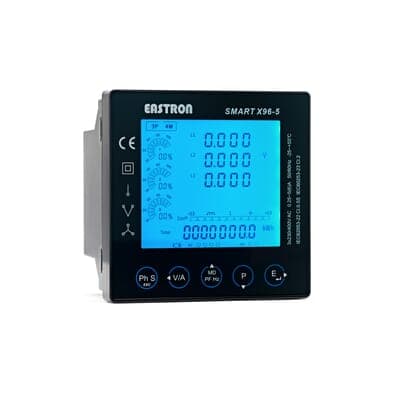
Eastron SMART X96-5J
Monitors electrical power quality parameters on single and three phase networks.
The Eastron SMART X96-5J is a multifunction power meter for single and three phase networks. This Modbus RTU template reads voltage, current, power, energy, frequency, and THD parameters. It supports both import and export active energy metering.
- Protocol
- Modbus RTU
- Connection
- RS485, 19200 baud
- Registers
- 24, read only
- Brand
- Eastron
- Key readings
- Voltage L1 to L3 (line and phase) · Current L1 to L3 · Total system power · Total active energy · Frequency · THD voltage and current harmonics
- Compatible models
- SMART X96-5J
- Last updated
Registers (24)
24 read, 0 write
| Name | Unit | Access | Address (Hidden until you enter your email) | Function (hidden) | Type (hidden) |
|---|---|---|---|---|---|
| Current L1 | A | Read | |||
| Current L2 | A | Read | |||
| Current L3 | A | Read | |||
| Voltage L1 | V | Read | |||
| Voltage L3 | V | Read | |||
| Voltage L2 | V | Read | |||
| Frequency | Hz | Read | |||
| Total system power | kW | Read | |||
| Total active Energy | kWh | Read | |||
| THD Voltage 2st=63st harmonic L1 | % | Read | |||
| THD Voltage 2st=63st harmonic L2 | % | Read | |||
| THD Voltage 2st=63st harmonic L3 | % | Read | |||
| THD Current 2st=63st harmonic L1 | % | Read | |||
| THD Current 2st=63st harmonic L3 | % | Read | |||
| THD Current 2st=63st harmonic L2 | % | Read | |||
| Voltage L1 to N | V | Read | |||
| Voltage L2 to N | V | Read | |||
| Voltage L3 to N | V | Read | |||
| THD average line to line volts | % | Read | |||
| THD volts L1 to L2 | % | Read | |||
| THD volts L2 to L3 | % | Read | |||
| THD volts L3 to L1 | % | Read | |||
| Total import active energy | kWh | Read | |||
| Total apparent energy | kVAh | Read |
Loading registers…
Send your device list
If a device is not in the library yet, we build the template for free as soon as we have the register data.
Use cases
- Monitor real-time voltage, current, and power on a live dashboard for single or three phase installations.
- Track import and export active energy consumption over time for billing verification or energy audits.
- Create alerts when THD voltage or current harmonics exceed acceptable thresholds in a facility.
- Compare line-to-neutral and line-to-line voltages across phases to detect imbalance issues.
- Log frequency deviations to verify grid stability at a customer site.
- Use historical energy data to generate monthly consumption reports for energy consultants.
Installation
Wire the RS485 A and B terminals of the Eastron SMART X96-5J to the corresponding RS485 terminals on your ModbusCloud Gateway.
Set the Modbus slave address on the SMART X96-5J using its front panel menu, and note the address for gateway configuration.
Confirm the baud rate is set to 19200 with even parity (8E1) on both the meter and the gateway.
Import the Eastron SMART X96-5J template from the ModbusCloud template library into your project.
Assign the correct Modbus slave address in the ModbusCloud device settings to match the meter configuration.
Verify data is flowing by checking live register values on the ModbusCloud dashboard, and confirm that power readings are positive under normal load conditions.
Things to watch for
I see negative power readings on the dashboard. Is the meter faulty?
Negative power values indicate that the CT (current transformer) is installed in reverse or the connection polarity is swapped. Reverse the CT orientation or swap the S1/S2 terminals to correct this.
What baud rate and parity settings should I use?
The template is configured for 19200 baud with even parity (8E1). Make sure both the SMART X96-5J meter and the ModbusCloud gateway match these settings exactly.
Why do some voltage registers show zero on a single phase installation?
On single phase networks, only L1 voltage and current registers will return values. L2 and L3 registers will read zero because those phases are not connected. This is normal behavior.
How are the float32 register values structured?
All registers use float32 format, meaning each parameter spans two consecutive 16-bit Modbus registers. The template handles this automatically, so no manual byte order configuration is needed.

Want to see how it works?
