








All topics
On this page
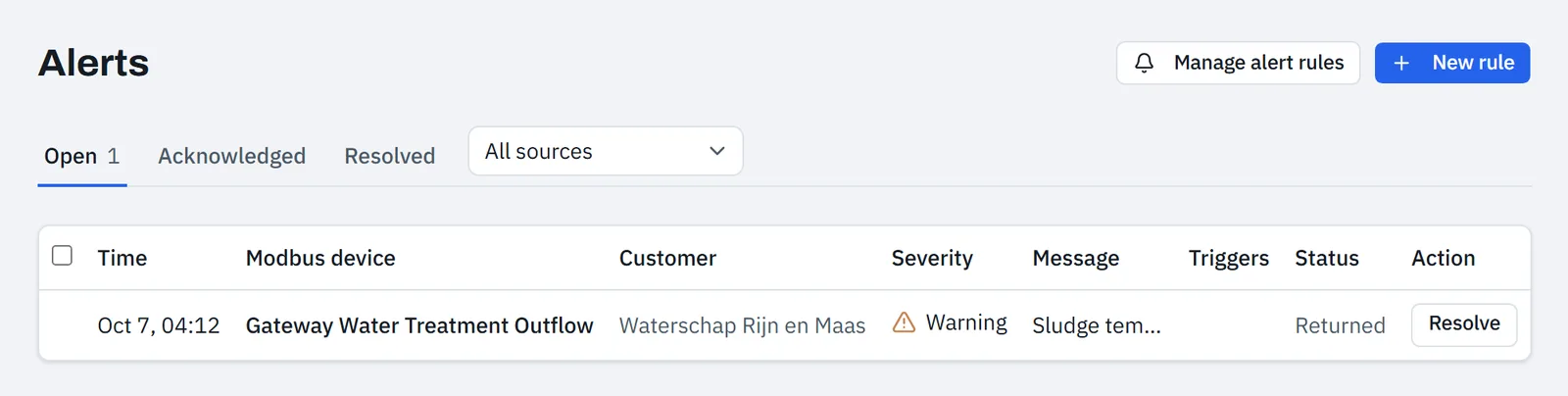
An alert belongs to one rule and one gateway. If the same rule fires again later, the same alert returns, even if it was already resolved. The Triggers column on the Alerts page shows how often it fired. With automatic monitoring there is one alert per check and per Modbus device or register.
Where an alert comes from
An alert comes from an alert rule or from automatic monitoring.
- You create an alert rule yourself, on a register or for the whole gateway. How that works is described in Create an alert rule.
- Automatic monitoring has five checks per gateway. Only a check set to On creates alerts.
A newly linked gateway immediately gets a number of default alerts, described in Automatic monitoring. One of them is the alert rule Gateway offline. It reports a gateway that stays silent for longer than the limit that ModbusCloud sets per gateway. For a new gateway this limit is about 5 minutes.
Severity of an alert
Every alert has the severity Info, Warning or Critical. You set the severity per alert rule, and per check in automatic monitoring. In the form for a new rule, Warning is already selected. The default rule Gateway offline is also set to Warning.
On the Alerts page the icon is blue for info, orange for warning and red for critical. A team member chooses per severity whether to receive alert emails, as described in Choose who receives alert emails.
Statuses of an alert
An alert is Active, Acknowledged, Returned or Resolved. The table shows when an alert changes status.
| From | To | When |
|---|---|---|
| No alert or Resolved | Active | The rule fires |
| Active or Acknowledged | Returned | The condition no longer holds |
| Returned | Active | The condition holds again. No new email, notification or webhook is sent |
| Active | Acknowledged | Someone clicks Acknowledge |
| Active, Acknowledged or Returned | Resolved | Someone resolves it with a note, or the portal resolves it itself |
A returned alert stays under Open until someone resolves it. This also applies to Gateway offline when the gateway is back online. An owner, admin or technician acknowledges and resolves alerts, as described in Handle an alert.
If a rule no longer runs, the portal resolves its open alerts itself. This happens when you turn off a rule or check, delete a rule or set a check to Trial run. Decommission gateway also resolves the open alerts of that gateway.
If an alert stays open or fires too often, read Alert does not fire, fires too often or stays open.
Email when the value is normal again
Whoever received the alert email gets one email as soon as the alert goes to Returned. The subject starts with "Weer normaal" (back to normal), followed by the name of the rule. If a measured value belongs to the alert, the email states the value at that moment.
One alert email leads to at most one "Weer normaal" email, even if the alert then flips back and forth. Resolving sends no email. A rule On change and a gateway that comes back online also send no "Weer normaal" email. If no alert email was sent, for example because of the cooldown, this email does not follow either.
Where you see alerts
The table shows where an alert appears.
| Place | What you see |
|---|---|
| Alerts page | The 200 alerts that fired most recently, with the filters Open, Acknowledged and Resolved |
| Overview page | The Active alerts block with the four alerts that fired most recently and are not yet resolved |
| Gateway page | The Alarms block above the tabs, with at most 10 unresolved alerts of that gateway |
| Bell in the top bar | A notification when an alert fires, except for Gateway offline |
| The alert email and the "Weer normaal" email | |
| Webhook | alert.triggered, alert.returned, alert.acknowledged and alert.resolved |
Under Open are the alerts that are Active and Returned. On the gateway page, an active alert shows Open instead of Active. With the list All sources you show only Rules or only Automatic monitoring.
You set who receives the email in Choose who receives alert emails. You set up a webhook in Set up a webhook.
How long alerts are kept
An alert stays until it is resolved. After that it is kept for 365 days with its history and notes. Notifications at the bell disappear after 90 days. The other periods are in Retention periods and exporting your data.
Updated on 7 October 2026
Still stuck?
Email or call us. Include the serial number of the gateway, so we can take a look straight away.
Go to support