








All topics
On this page
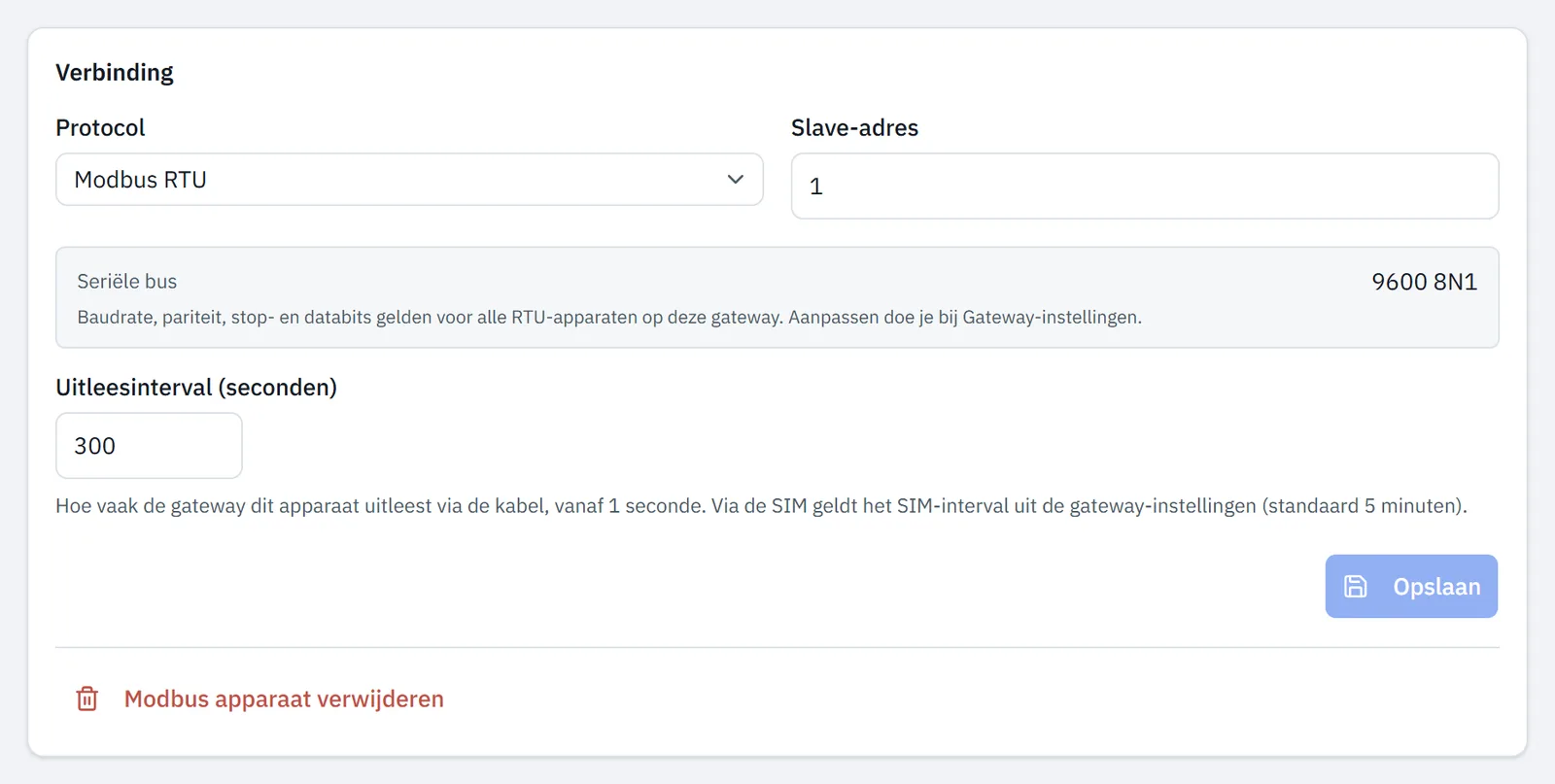
A new Modbus device starts at 300 seconds (5 minutes), even if automatic search added it. If you add a Modbus device with a template from the library or a custom template, the field Uitleesinterval (seconden) (polling interval in seconds) also appears in the Configure Modbus device window.
What you need
- The role Owner, Admin or Technician in your organisation. A team member with read-only access sees the polling interval but cannot change it.
Which interval the gateway uses
Each Modbus device has its own polling interval. How often the gateway actually reads it depends on the connection it sends over. The table shows this per connection.
| Gateway sends over | Polling interval |
|---|---|
| Cable | The interval of the Modbus device, from 1 s |
| SIM (4G) | The SIM interval of the gateway, or the interval of the Modbus device if that is longer |
| Cable or SIM, gateway with older software | The interval of the Modbus device, at least 60 s |
The gateway checks which connection it sends over and switches interval by itself. When the SIM takes over is described in 4G and the backup SIM.
A gateway with older software does not report its connection. In Gateway settings, Verstuurt nu via (sending now via) then shows the value Onbekend (unknown). If you enter less than 60 seconds for such a gateway, the portal shows a warning under the field.
What the history stores
Live values, alerts and automations receive every reading. The history stores the first reading of each minute per register. At 300 seconds it holds one reading per 5 minutes, and at 1 second one per minute.
Charts and Download readings show the history. How to open a chart is described in View values and charts.
Choose a suitable interval
An interval below 60 seconds only helps if live values, alerts or automations must react quickly. The history does not become finer.
A long interval shows an outage later. If the gateway is online, a Modbus device gets the status Timeout after five times its polling interval without a reading, but never within 15 minutes. An alert rule On inactivity does not fire earlier either. At 3600 seconds you therefore see an outage only after 5 hours.
With Modbus RTU, the RS485 bus sets how short the interval can be. All Modbus RTU devices on the gateway share one bus, and the gateway reads each register with its own request. If a Modbus device does not answer, the gateway waits up to 1 second per register. If a round takes longer than the interval, values arrive less often than set.
You can calculate how long a round takes with the lesson Calculate your poll interval and bus load. Count one transaction per register.
Read a kWh meter with peak and off-peak tariffs more often than every 900 seconds (15 minutes). The portal fills longer gaps by spreading the consumption evenly, as Set up peak and off-peak tariffs per kWh meter explains.
Change the polling interval
You change the polling interval of an existing Modbus device on the page of that Modbus device.
Open the gateway
Open the gateway.
Open the Modbus device
Under Modbus devices, click the card of the Modbus device. The page of the Modbus device opens.
Enter the interval
Under Connection, in Uitleesinterval (seconden), enter a value from
1to86400.Save the change
Under Connection, click Save. The portal reports Opgeslagen en naar de gateway gestuurd (saved and sent to the gateway).
Change the SIM interval
The SIM interval applies to all Modbus devices on the gateway and is 300 seconds (5 minutes) by default. It belongs to the Gateway settings. Under Uitlezen via de SIM (reading over the SIM), Verstuurt nu via shows whether the gateway currently sends over Kabel (cable) or SIM.
The status Timeout and the alert rule On inactivity use the interval of the Modbus device, also over the SIM. A SIM interval of 1800 seconds therefore gives a Modbus device set to 60 seconds the status Timeout between two readings, even though it does answer. This happens as soon as the SIM interval is longer than 15 minutes and longer than five times the interval of the Modbus device.
Open the gateway
Open the gateway.
Open the settings
Click the pencil at the top right (Gateway settings). The page Gateway settings opens.
Enter the SIM interval
Under Uitlezen via de SIM, in Uitleesinterval via de SIM (seconden) (polling interval over the SIM in seconds), enter a value from
60to86400.Save the change
In the same block, click Save. The portal reports SIM-interval opgeslagen en naar de gateway gestuurd (SIM interval saved and sent to the gateway).
Updated on 7 October 2026
Still stuck?
Email or call us. Include the serial number of the gateway, so we can take a look straight away.
Go to support